I have two Laravel apps in production. PelotaYa helps people who run football pitches in Peru handle bookings, cash and debtors. Dóich teaches German to Spanish speakers, for free, because apparently I like hobbies that come with a hosting bill.
I set out to raise their PageSpeed scores and ended up somewhere else. Most of what reached the servers wasn’t human. One scanner asked Dóich for /.env.anthropic. I respect a bot that keeps up with the news.
The short version
| pelotaya.com | doichapp.com | |
|---|---|---|
| Hosting | A VPS through Laravel Forge | Laravel Cloud, scales to zero |
| PageSpeed, mobile | 69 → 97 | 78 → 100 |
| Largest Contentful Paint | 6.2 s → 2.6 s | 4.7 s → 0.9 s |
| What a bot costs me | CPU | Money |
- The speed. Mostly the same idea in both apps: Cloudflare serves the public pages as finished HTML, so the server doesn’t have to think at all.
- The bots. Both domains sit behind my own Cloudflare zone, which sees every request before the server does. A few custom rules now block scanners and challenge traffic from countries where nobody uses the apps. On PelotaYa, about 79% of requests stop there.
- The price. Cloudflare’s free plan. Nothing paid was added.
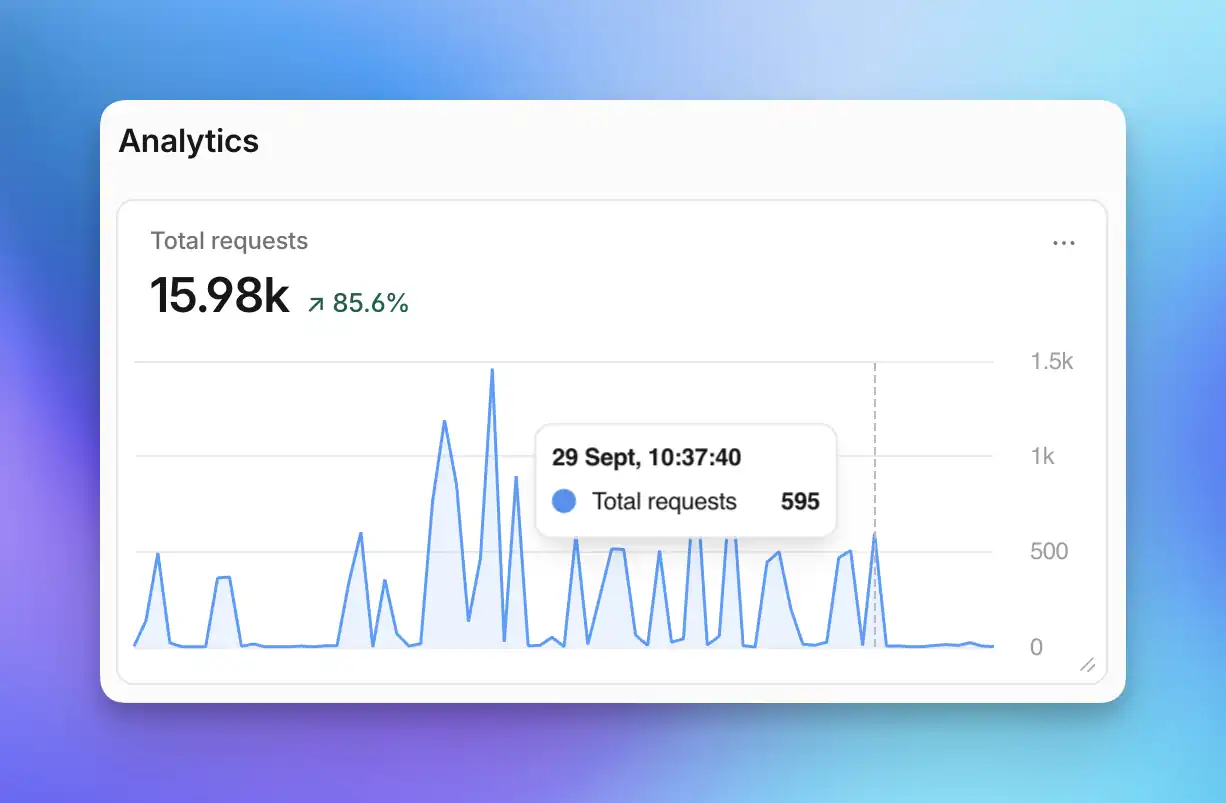
Both apps share one Cloudflare account, so this is their traffic combined. Those spikes are not a marketing campaign.
The coding agents did the digging through traces, headers and request logs. I decided what shipped, and argued with them about what counts as done. The rest of the post is details, for anyone who wants them.
Why a bot costs money on one app and not the other
PelotaYa runs on a VPS with a fixed monthly price. Business micro-sites live on {slug}.pelotaya.com, so there’s a wildcard DNS record, and scanners love a wildcard. They guessed api-staging, backend-dev, api-internal and friends about a thousand times each per day. Every guess reached Laravel, which booted, looked the subdomain up in the database and politely answered 404. The bill doesn’t change, but a small server was spending real CPU on nobody.
Dóich runs on Laravel Cloud with scale-to-zero: the app sleeps when nobody uses it, and compute is billed only while it’s awake. The catch is that any request wakes it, a 404 included, and then it stays up for about five minutes. So a scanner asking for /.env.production at 3 a.m. bought five minutes of compute, billed to me.
The last two full billing periods came to $10.16 and $9.41, and about $4.50 of each was compute, the line that bills awake time. The changes went live today, so there’s no “after” number yet. I’ll add it here when the next period closes in November.
That comparison is also the next question. Now that PelotaYa’s server mostly serves humans and Cloudflare handles most of the rest, moving it to Laravel Cloud, where idle costs nothing, might end up cheaper than the VPS. Dóich is the test run.
pelotaya.com, in detail
The front end had four problems:
- 200 JavaScript files nobody asked for. A package I use had quietly switched on Vite’s aggressive prefetching, so every visitor downloaded about 580 KB of JavaScript, mostly admin screens they will never see. One line of config, and the biggest single jump.
- Fonts from somewhere else. Four files from a third-party CDN blocked the first paint. Now it’s one self-hosted variable font, 30 KB instead of 72.
- The whole dictionary on every page. The entire translation catalog was embedded in every page, more than half of the HTML. The landing now ships only the 11 groups it uses, and a test keeps it that way.
- One invalid
aria-label. Accessibility went from 96 to 100.
Lighthouse 13 also has a new “agentic browsing” category, which docked a point because /llms.txt didn’t exist. Now it does. Yes, in a post about blocking bots, I added a file just for bots.
That got the score to somewhere between 86 and 95, depending on the run. The ceiling was the server: about 500 ms before the first byte, because every request went through PHP.
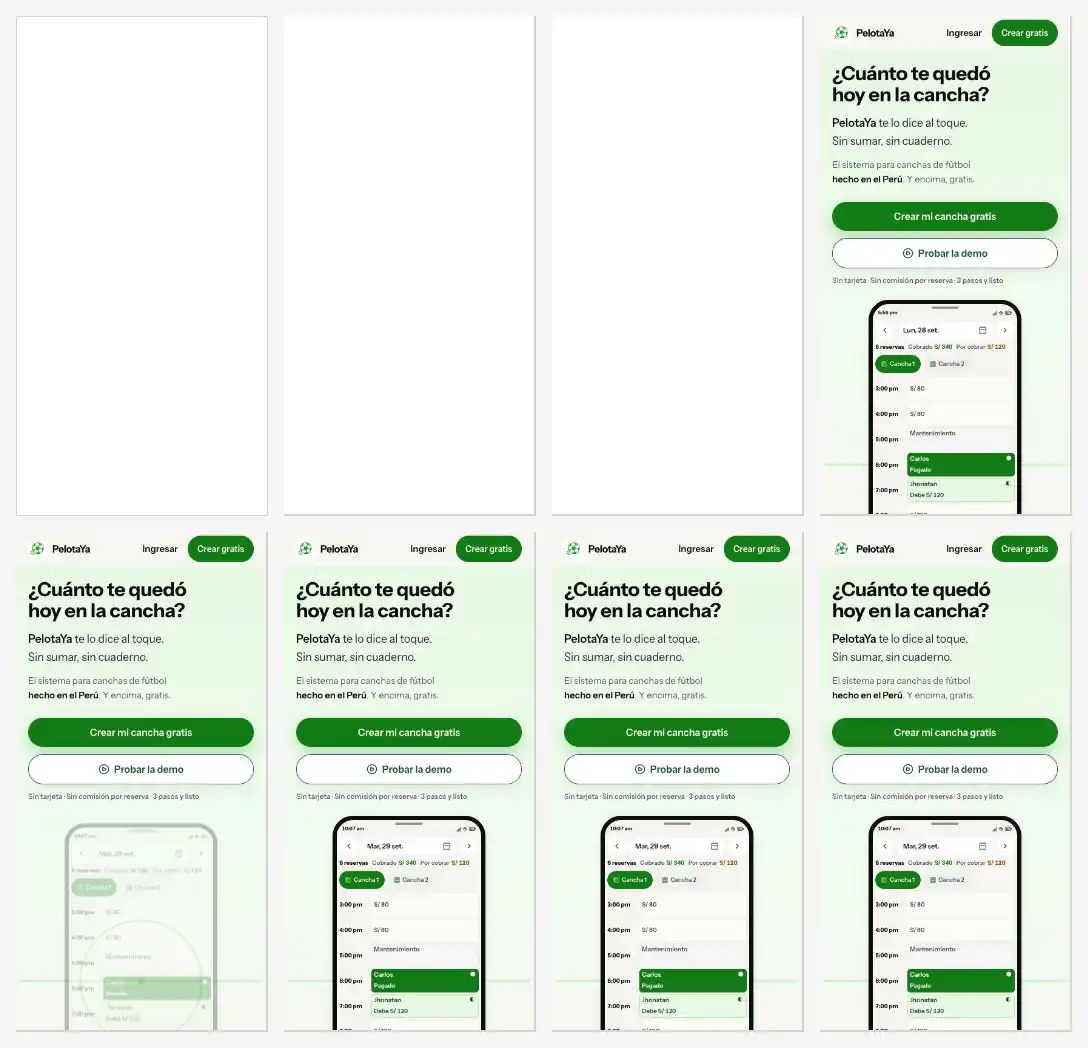
The landing loading on a simulated slow phone, at 375, 1,125, 1,875 and 2,250 ms. Before on top, after below:
Caching the HTML is where it got interesting, because “cache everything” doesn’t work for an Inertia app:
- Laravel sets two cookies on every response, and Cloudflare never caches a response that sets cookies.
- Inertia uses the same URL for the full HTML page and for the JSON it fetches when you navigate inside the app. Cloudflare’s free plan ignores
Vary, so a cached HTML page could be handed to a JSON request, and Inertia would render the whole page inside a modal. Creative, but no. - A cached page has no session, so the first form sent from it would fail with a 419, Laravel’s “page expired”.
The free plan can skip the cache based on a cookie or a header, but it can’t vary the cache by one. So: bypass, never vary. Only the landing, terms and privacy pages are cached. For an anonymous visitor, a middleware starts no session and sends no cookies:
cache-control: max-age=0, public, s-maxage=600, stale-while-revalidate=60cf-cache-status: HITAnyone with a session cookie, or any Inertia request, skips the cache. The app fetches a CSRF cookie from a tiny endpoint right before the first form submission, and the deploy script purges Cloudflare at the end. The tests check that a cacheable page carries no cookies, no user and no CSRF token. Then I broke the middleware on purpose five different ways, and every break failed a test.
Time to first byte on the landing went from 450–900 ms to 16–60 ms, and the score settled at 97.
The scanners got three custom rules, out of the five the free plan allows. Two block about 200 common guesses (environments, admin panels, CI tools, databases) plus patterns like api-* and staging-*. The third shows a managed challenge to traffic from outside Peru, Germany and Ireland. People pass it, usually without noticing. Scripts don’t. Verified bots, webhooks and PageSpeed are exempt.
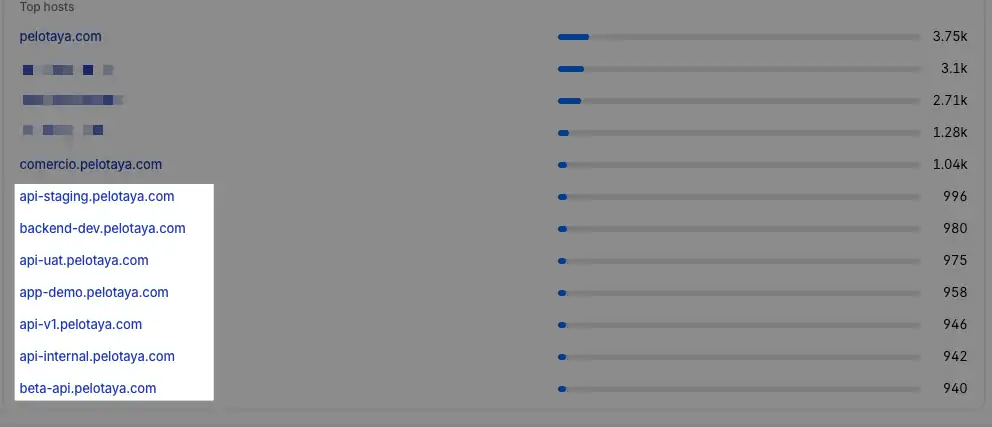
In the first 100 minutes, 3,193 of about 4,020 requests stopped at Cloudflare. The Netherlands alone sent 2,065, which is a lot of interest in pitch bookings in Lima. Some scanners switched to names that aren’t on the block list, and the country challenge caught those anyway. That’s the case for having both.
A few hours later, the list went. A blocklist is always one guess behind: on day one the scanners were already trying digital. and review., which nobody had put on it. So I flipped it. One rule now blocks every *.pelotaya.com hostname except www, the business sites that have been published, and demo tenants, which the rule recognizes by the shape of their names. Every visitor who tries the demo gets their own subdomain, so listing those was never an option.
The app keeps that rule current by itself. When an owner publishes their site for the first time, a queued job rewrites the rule through Cloudflare’s API, and the new subdomain works within seconds. The same sync runs on every deploy and once a day, just in case.
| Before | Now | |
|---|---|---|
| What gets blocked | About 200 names someone thought of | Every name that isn’t a real site |
| Custom rules used | 3 of 5 | 2 of 5 |
Still free. The honest limit: one rule fits roughly 120 published sites, and past that the app will have to split it. I’ll worry about it when PelotaYa has that problem, which would be a nice problem to have.
doichapp.com, in detail
The PageSpeed part was short. The landing was rendered entirely in the browser: the HTML arrived as an empty <div id="app"></div>, and the headline waited 3.1 seconds for JavaScript. Server-side rendering for the landing only, inlined CSS, WebP screenshots, and a fade-in animation removed. 100 in all four categories, LCP at 0.9 seconds.
In fairness, the performance score still jumps around. Some runs land between 72 and 84, because of the work Vue does after the first paint, measured on shared test machines. The only guaranteed 100 is dropping Vue from the landing, and I’m not doing that.

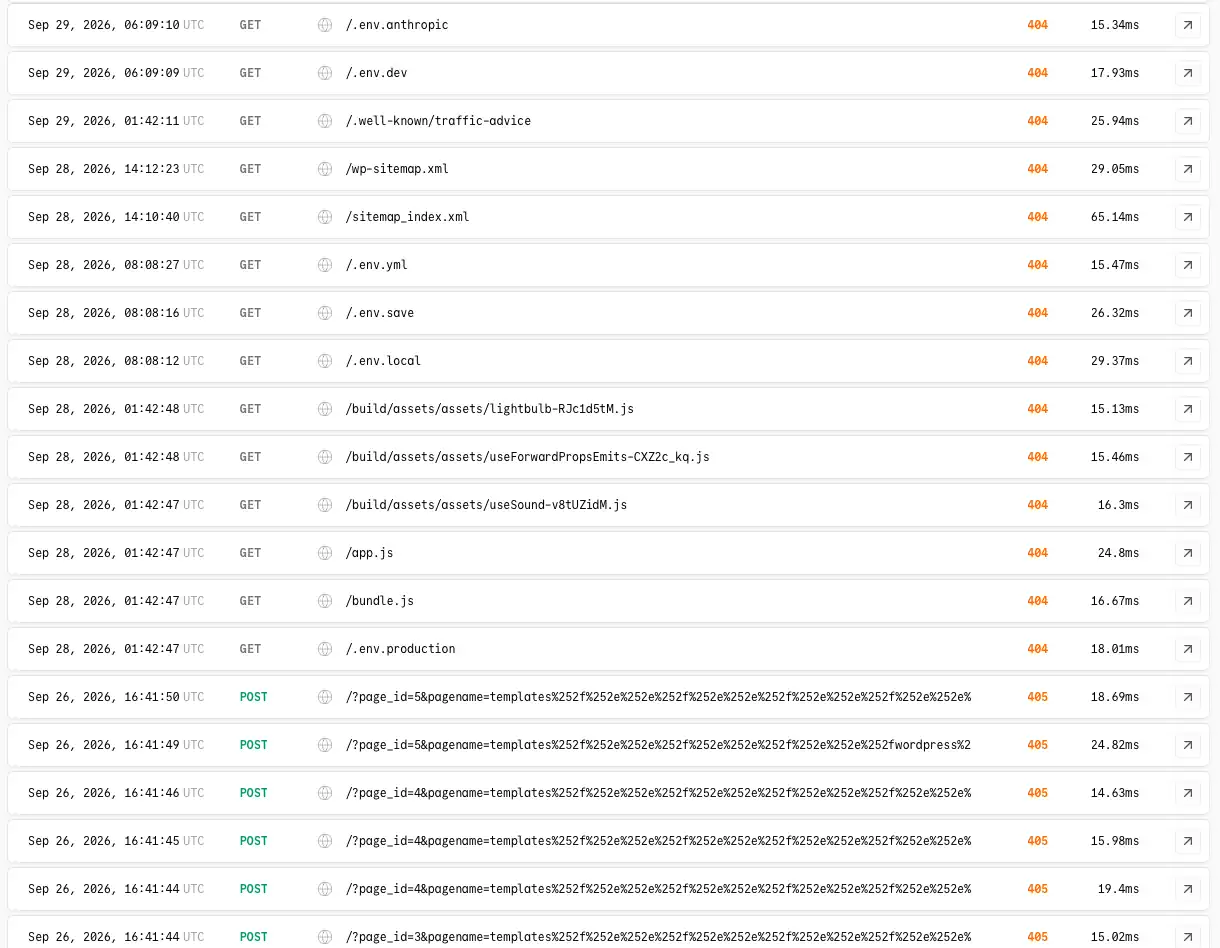
What was waking the app up was mostly this: /.env.dev, /.env.local, /.env.save, WordPress sitemaps, and WordPress exploit attempts several times per second. On an app with no WordPress. Each got a 404 in 15–30 ms, which sounds cheap until you remember the app had to wake up first.
Two custom rules. The first blocks scanner paths from everywhere: /.env, /.git, /wp-, anything ending in .php, and any POST to the home page. The app has none of those. The second challenges traffic outside Peru, Germany, Spain and Ireland, where the actual learners are, with verified bots, link previews and PageSpeed exempt. I also turned off the app’s *.laravel.cloud hostname, which skipped my Cloudflare zone entirely.
In the first hour, someone in Egypt went for /xmlrpc.php and someone in Russia tried to install WordPress. Both blocked, neither woke the app.
The cache uses the same trick as PelotaYa: the home page runs without the session middleware, so it sets no cookies and Cloudflare keeps it for an hour. Build files and fonts are cached for a year, and the service worker never, because a stale one is how PWA updates get stuck. A small Artisan command purges the Cloudflare zone on every deploy. A logged-out visitor now gets the whole landing from Cloudflare, and Laravel Cloud keeps sleeping.
What’s left
- PageSpeed is a lab score. Google ranks with field data from real Chrome users, which takes about 28 days to catch up.
- PelotaYa isn’t at 100. Inlining critical CSS is next. So is building the front end somewhere else, since doing it on the same small server causes a few 504s during deploys.
- Dóich’s bill. November will say whether sleeping through the night actually saves money.
I set out to chase a number for Google, and most of the work turned out to be telling bots no. Politely, with a 403.